Share Your Card
Turn your Series Finale into a single image to post or send, and what it does and doesn't include.
Last updated October 1, 2026
Your share card sums up your year in one image, sized for posting (1080 × 1350).
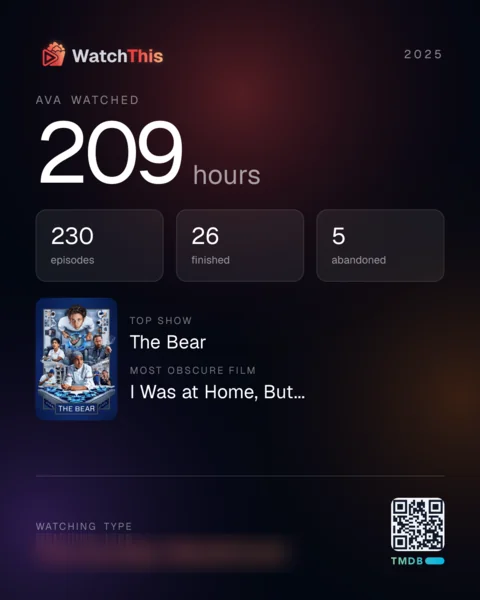
- From the full recap: select Share at the top of the page. On a phone, this is the share icon.
- From the story: go to the last card and select Share your card.
What happens next depends on your device:
- On most phones and tablets, your device's share sheet opens with the image attached, so you can post it or send it to someone.
- On most computers, the image downloads as a PNG file (for example
series-finale-2025.png) for you to post wherever you like.
If the card can't be made, you'll see "That card could not be made. Try again in a moment." Select Share again to retry.
- your username and the year;
- your total hours;
- episodes watched, titles finished, and shows abandoned;
- your top show and its poster;
- your most obscure film;
- your watching type;
- a QR code.
The card only ever describes your year. It never includes your crew, your friend comparisons, or anyone else's names or numbers, even though those appear in your recap.
The QR code links to the WatchThis home page, not to your recap. Your Series Finale is only visible to you when you're signed in; nobody can open it from the card.
- A quiet year has no card. If your year was too quiet for a full Series Finale (fewer than 10 episodes and fewer than 5 titles finished), there's nothing to share.
- Your card matches your recap. Both come from the same snapshot of your year, so the numbers always agree.
- Your username is drawn as it is now. If you change your username, new cards use the new one.